
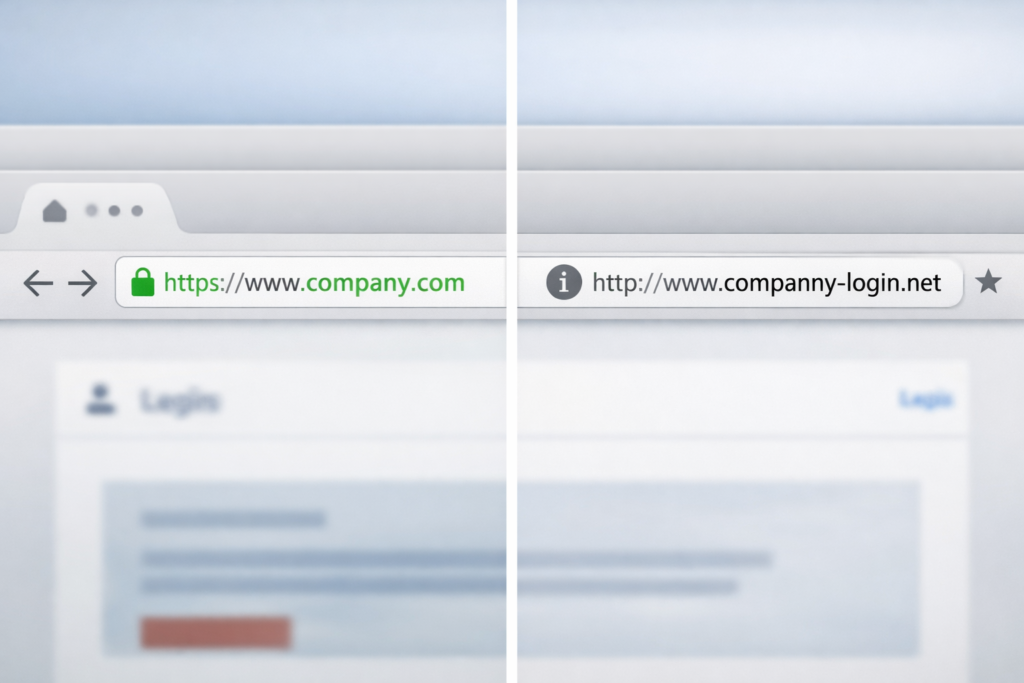
Fake login pages and phishing websites are one of the most common ways scammers steal passwords, financial information, and personal data. These sites are carefully designed to look legitimate, often copying the branding and layout of banks, email providers, social media platforms, and online retailers. At a quick glance, they can appear authentic, but there are reliable ways to spot them once you know what to check.
What is a fake login page?
A fake login page is a fraudulent website created to imitate a real sign-in page with the goal of capturing your username, password, or other sensitive information. When you enter your details, they are sent directly to scammers rather than the legitimate company, allowing criminals to take over accounts, steal money, or use the information for further scams.
How people end up on phishing websites
Most people do not intentionally visit phishing websites and instead arrive there through everyday online activity. Common paths include clicking links in emails that claim there was suspicious account activity, receiving text messages about missed deliveries, tapping links in social media messages, or clicking sponsored search results that look like official company pages. Many of these messages resemble scams you may already be familiar with, such as Google Tech Support Scams or Fake Package Delivery Texts, and rely on urgency to push people to act quickly.
Warning signs of a fake login page
Even well-made phishing websites usually contain subtle warning signs. The web address is often the biggest clue, with slight misspellings, extra words, unusual characters, or unfamiliar domain endings that differ from the company’s real website. Visual inconsistencies are also common, including blurry logos, mismatched fonts, awkward spacing, or branding that feels slightly outdated. Another red flag is being asked for information that is not normally required during a standard login, such as full Social Security numbers, complete credit card details, or one-time security codes immediately after entering a password.
ScamProtector Pattern – Sense of urgency
Fake login pages are designed to create urgency and blend into normal online activity. If a message pressures you to log in immediately, pause and take a closer look at the web address before entering any information. Legitimate companies rarely force instant action through unexpected links.
How to safely check a login page before signing in
Before entering your login information, slow down and look closely at the address bar to confirm the domain matches the company’s official website exactly. Avoid signing in through links whenever possible and instead open a new browser tab and manually type the known web address or use a trusted bookmark. While a secure HTTPS connection alone does not guarantee a page is legitimate, the absence of HTTPS is a strong warning sign that you should not proceed.
Tools that can help protect you
Browsers, password managers, and security tools can provide valuable protection against phishing websites. Password managers are especially effective because they will often refuse to autofill login credentials on fake or mismatched domains, which can serve as an early warning. These tools work best when paired with strong account security habits, such as those outlined in How to Secure Your Online Accounts.
What to do if you think you entered your login information
If you believe you may have entered your login details into a fake website, act quickly to reduce potential damage. Change your password immediately on the legitimate site and update it anywhere else you reused that password, then enable two-factor authentication if it is available. Review recent account activity for anything unfamiliar and consider notifying the company so they can watch for unauthorized access.
Building safer online habits
Phishing websites succeed because they blend seamlessly into normal online activity, making them easy to overlook. Developing simple habits such as checking URLs, avoiding urgent login requests, and accessing accounts through trusted bookmarks can significantly reduce your risk. For more examples of how these tactics are used across different scenarios, browse the scams covered in your Common Scams and Emerging Scams sections.