
What are phishing scams?
Phishing scams trick you into revealing personal information — passwords, credit card numbers, Social Security numbers, or bank account details — by impersonating a trusted company, government agency, or person you know. The scammer sends you a message that looks legitimate and includes a link to a fake website or an attachment that installs malicious software on your device.
Phishing is the most reported type of cybercrime in the United States. The FBI’s Internet Crime Complaint Center received 193,407 phishing or spoofing complaints in 2024, making it the number one complaint category for the year. Phishing losses quadrupled compared to 2023, reaching $70 million in direct financial losses reported to IC3 — and that figure doesn’t account for the billions lost through follow-on crimes like account takeovers, identity theft, and business email compromise that begin with a phishing attack.
The term “phishing” covers a broad range of attacks delivered through different channels — email, text messages, phone calls, QR codes, and social media. What they all share is the same core tactic: creating a convincing imitation of something you trust to trick you into acting before you think.
How phishing scams usually work
Phishing attacks vary in their delivery method and sophistication, but they follow the same basic pattern: impersonate a trusted source, create urgency, and direct you to take an action that exposes your information. Here are the most common types.
Email phishing
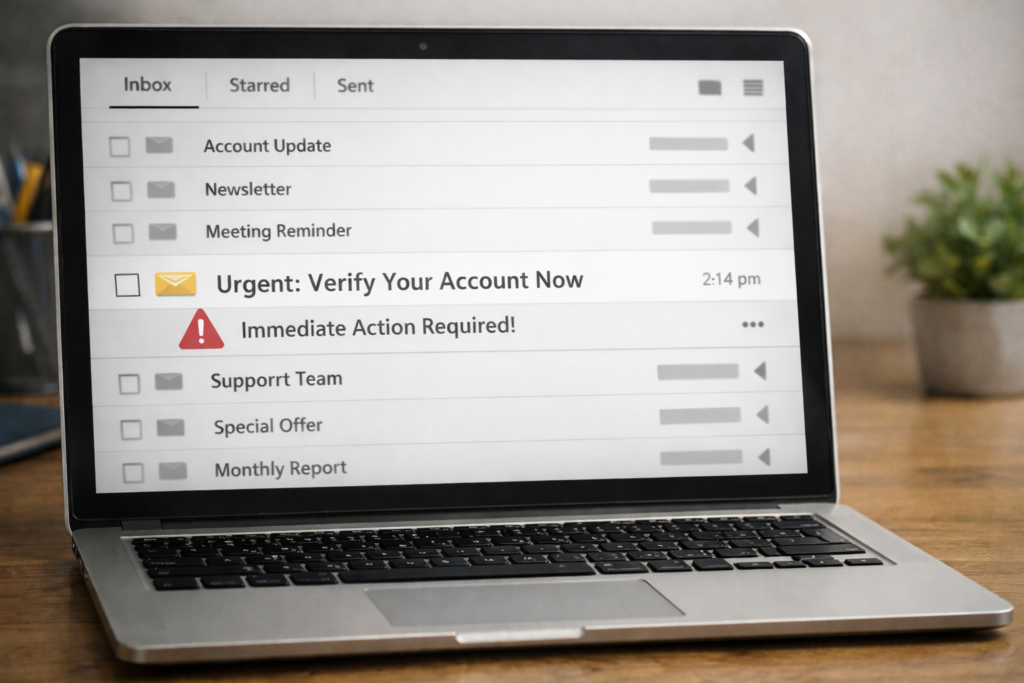
Email is still the most common delivery method for phishing attacks. You receive an email that appears to come from a company you use — your bank, Amazon, Netflix, Microsoft, PayPal — claiming there’s a problem with your account that requires immediate action. The email includes a link to a website that looks identical to the real company’s login page. When you enter your username and password, the scammer captures them.
Phishing emails have become significantly harder to spot. AI-generated phishing messages now closely mirror real brand communications in tone, formatting, and visual design. Spam accounts for nearly 47% of all email traffic, and approximately 1 in every 412 emails is a phishing attempt. For a deeper look at email-specific tactics, see our article on the email phishing scam.
Common email phishing scenarios include password reset requests (covered in our article on the fake password reset email scam), subscription renewal notices, purchase confirmations you didn’t make, and alerts about “suspicious activity” on your account.
Text message phishing (smishing)
Smishing — phishing delivered via SMS text message — has exploded in recent years. Reported losses to text scams reached $470 million in 2024, more than five times the amount reported in 2020. Smishing incidents rose 22% in the third quarter of 2024 alone, and URL-laden SMS scams now make up over 55% of text-based threats.
Text phishing messages typically claim to be from delivery services, banks, toll agencies, or government departments. They include a shortened link that takes you to a fake website. Common smishing messages include fake delivery notifications (the USPS delivery problem text scam is one of the most widespread), fake bank fraud alerts, toll payment demands, and tax refund notices.
Text phishing is particularly effective because people tend to trust text messages more than emails. Texts feel personal and urgent, and shortened URLs make it hard to see where a link actually leads before you click it.
Voice phishing (vishing)
Vishing attacks come as phone calls from scammers impersonating banks, government agencies, or tech companies. The caller claims your account has been compromised, you owe money, or your computer has been infected with malware. Vishing attacks increased by 28% in the third quarter of 2024.
The caller often asks you to “verify” your identity by providing your account number, Social Security number, or one-time security code. In more aggressive versions, they guide you through installing remote access software on your device, giving the scammer direct control of your computer.
Caller ID spoofing makes these calls appear to come from legitimate phone numbers. A call that shows your bank’s name and number on your screen may actually be coming from a scammer’s phone.
Spear phishing and business email compromise
Spear phishing targets specific individuals using personal information gathered from social media, data breaches, or previous interactions. Instead of a generic “Dear Customer” message, you receive an email that uses your real name, references your actual employer, or mentions a transaction you recently made.
Business email compromise (BEC) is the corporate version of spear phishing. Scammers impersonate executives, vendors, or business partners to trick employees into transferring money or sharing sensitive information. BEC caused $2.77 billion in losses in 2024 alone, and nearly $8.5 billion over the past three years. In February 2024, Pepco Group lost approximately €15.5 million in a BEC attack targeting its Hungarian branch through carefully crafted phishing emails.
Sixty-five percent of targeted cyberattacks use spear phishing as their primary method, making it the most common approach for attackers going after specific organizations or individuals.
QR code phishing (quishing)
A newer phishing method involves malicious QR codes placed in emails, printed flyers, parking meters, restaurant menus, or public spaces. When you scan the QR code with your phone, it takes you to a fake website that asks for login credentials or payment information. Security researchers observed 4.2 million QR code phishing threats in the first half of 2025 alone.
Real-world examples
Patti from White Bluff, Arkansas received a call from someone claiming to be with the FBI in early 2024. The caller said the investment company Patti used for retirement was fraudulent, and she needed to transfer her funds into an “FBI holding account” to protect them. Patti liquidated $300,000 in retirement savings. Over the following weeks, she completed a series of Bitcoin deposits, purchased gift cards, and made nine wire transfers before realizing she was being scammed. She lost $400,000 total. It took her weeks to tell anyone because of the shame she felt.
Timothy from Columbus, Ohio visited what he believed was Microsoft’s website in early 2024. His computer locked up and displayed a phone number for “Microsoft support.” When he called, a person named “Jerry” told Timothy his computer had been hacked and walked him through a series of steps that gave the scammer remote access to his machine and his personal information.
Pepco Group, a European retail company, lost approximately €15.5 million ($16.8 million) in February 2024 when scammers targeted its Hungarian division with phishing emails. The emails were crafted to appear as legitimate internal communications and were used to authorize fraudulent wire transfers.
A nonprofit in Seattle received a threatening email in April 2024 claiming the organization hadn’t trademarked its name and would lose legal rights to use it within 24 hours. The email included a link to a fake trademark registration site. The organization’s director, John, contacted the U.S. Patent and Trademark Office directly and confirmed their trademark was valid — successfully avoiding what could have been a significant loss.
Red flags: Legitimate messages vs. phishing
| Legitimate Messages | Phishing Warning Signs |
|---|---|
| Come from verified company email domains (e.g., @amazon.com) | Come from slightly misspelled or unfamiliar domains (e.g., @amaz0n-support.com) |
| Address you by your real name | Use generic greetings: “Dear Customer” or “Dear User” |
| Reference specific account details you recognize | Reference vague “account activity” without specifics |
| Don’t ask you to click a link to enter your password | Include urgent links to “verify” or “update” your account |
| Provide information consistent with what’s in your actual account | Contain details you can’t find when you log in directly |
| Use professional tone without pressure | Create urgency: “Your account will be closed in 24 hours” |
| Never ask for sensitive info via email or text | Ask for passwords, SSN, or credit card numbers through a link |
| Links point to the company’s real domain when you hover over them | Links point to unfamiliar URLs or use URL shorteners to hide the destination |
How to protect yourself
Check the sender’s email address carefully. The display name might say “Bank of America,” but the actual email address might be something like support@boa-security-alert.com. Hover over or tap the sender name to reveal the full email address. Legitimate companies send from their official domains.
Don’t click links in unexpected messages. If you receive an email or text about a problem with your account, don’t click the link. Open a new browser tab and go directly to the company’s website by typing the URL yourself. If the issue is real, you’ll find it in your account dashboard. Our guide on How To Spot Fake Login Pages and Phishing Websites shows you exactly what to look for.
Look for urgency and threats. Phishing messages almost always create artificial time pressure: “Act within 24 hours,” “Your account will be suspended,” “Respond immediately to avoid charges.” Real companies give you reasonable time to address issues and don’t threaten you via email or text.
Enable two-factor authentication on all important accounts. Two-factor authentication (2FA) adds a second step to your login — usually a code sent to your phone. Even if a scammer captures your password through a phishing page, they can’t access your account without that second code.
Never share one-time security codes. If you receive a verification code you didn’t request, or if someone calls asking you to read them a code that was sent to your phone, don’t share it. That code is the second factor of your authentication, and sharing it gives a scammer everything they need to access your account.
Keep your software updated. Phishing emails sometimes include attachments that exploit software vulnerabilities to install malware. Keeping your operating system, browser, and antivirus software up to date closes many of these entry points.
Use a password manager. Password managers autofill your credentials only on websites that match the exact URL you saved. If a phishing page looks identical to your bank’s login page but has a different URL, your password manager won’t fill in your credentials — giving you an immediate visual cue that something is wrong.
What to do if you’ve been affected
If you clicked a link but didn’t enter any information: You’re likely fine, but run an antivirus scan to be safe. See our detailed guide on I Clicked a Suspicious Link — What Should I Do Now? for a full breakdown of when you need to act and when nothing happened.
If you entered your password on a fake site: Change that password immediately — go directly to the real website and update it. If you use the same password on other accounts, change those too. Enable two-factor authentication on the affected account. For a complete walkthrough, see How To Secure Your Online Accounts.
If you entered credit card or bank information: Contact your bank or credit card company immediately. Tell them the card details may have been compromised. They can freeze the card, issue a new number, and monitor for unauthorized charges.
If you entered your Social Security number: Place a fraud alert on your credit reports by contacting Equifax, Experian, or TransUnion (contacting one bureau is sufficient — they’re required to notify the others). Monitor your credit report at annualcreditreport.com for accounts you didn’t open. Consider placing a credit freeze, which prevents new accounts from being opened in your name.
If you downloaded an attachment or installed software: Disconnect from the internet immediately. Run a full antivirus scan. If the scan finds anything, follow the removal instructions. If you’re not confident the threat has been removed, consider having a professional inspect your device.
Report the phishing attempt: Forward phishing emails to the Anti-Phishing Working Group at reportphishing@apwg.org. Forward phishing texts to 7726 (SPAM). Report to the FTC at reportfraud.ftc.gov. If you lost money, file a complaint with the FBI’s IC3 at ic3.gov.