
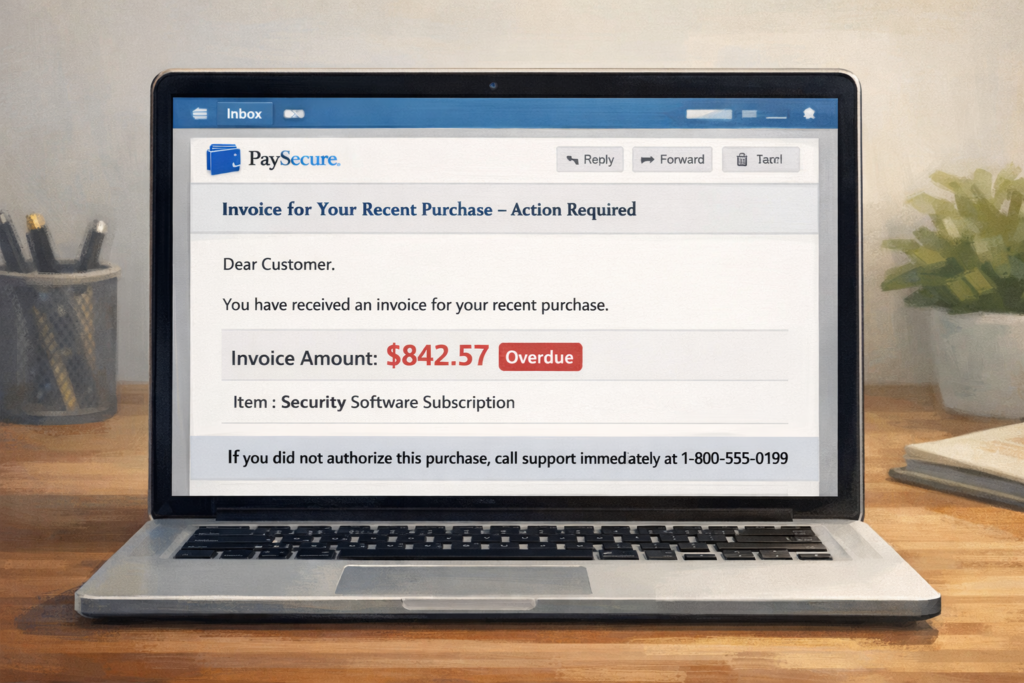
What is the scam?
The PayPal invoice scam is a payment request scam where you receive a legitimate invoice through PayPal’s system for an expensive product or service you never ordered. The invoice appears to come from a real business and uses PayPal’s actual invoicing system, which makes it look trustworthy.
The invoice typically includes a phone number with instructions to call if you did not authorize the purchase. This is the trap. The number connects to scammers, not PayPal support. These invoices are real PayPal requests—scammers abuse PayPal’s business tools to send them—but the charges and contact information are fraudulent.
Common items listed include electronics, software subscriptions, antivirus renewals, or cryptocurrency purchases, usually for amounts between $300 and $1,500. The scam relies on the panic you feel when you see an unexpected charge in your email.
How this scam usually works
The scam starts when you receive an email notification from PayPal (often from noreply@paypal.com or similar official addresses) stating that you have an invoice or payment request. When you open the email, you see what looks like a legitimate PayPal invoice for a purchase you don’t recognize.
The invoice includes specific details like an order number, item description, price, and a note that says something like “Please contact customer support immediately if you did not authorize this purchase” followed by a phone number. The scammers are counting on you to react quickly without thinking carefully about what’s happening.
If you call the number, someone claiming to be from PayPal or the merchant will answer. They may sound professional and have access to some of your information to seem legitimate. They’ll confirm that yes, there is a charge pending, and they’ll offer to help you cancel it.
To “cancel” the invoice, they’ll ask you to provide verification information, download remote access software so they can “process the refund,” or send money through a different method to “reverse” the charge. Some variations involve the scammer claiming they accidentally refunded too much money and asking you to send the difference back.
The goal is either to steal your account credentials, gain remote access to your computer, or convince you to send them money directly. The original invoice often remains unpaid—it was just bait to get you on the phone.
How to protect yourself
The most important rule is never call phone numbers provided in unexpected invoices or payment requests. PayPal does not include support phone numbers in invoices, and legitimate merchants don’t ask you to call to cancel unauthorized charges.
If you receive a PayPal invoice for something you didn’t order, log into your PayPal account directly by going to PayPal.com and typing in your credentials (never clicking links from the email). Once logged in, check your Activity or Wallet section to see if there’s an actual pending payment. In most cases, these scam invoices are just requests that you haven’t paid yet, which means no money has left your account.
You can report and decline the invoice directly through PayPal’s system. Go to Activity, find the invoice, click on it, and select the option to report or decline. PayPal investigates these reports and can take action against accounts sending fraudulent invoices.
A practical rule that prevents most losses: treat any unexpected payment request as suspicious until you verify it through official channels. Contact PayPal through their official website or app if you need assistance, not through numbers provided in emails.
What to do if you’ve been affected
If you only received the invoice but haven’t called the number or made any payments, simply report and decline the invoice through your PayPal account. No further action is needed. You can also mark the email as phishing by forwarding it to phishing@paypal.com.
If you called the number and provided account information, change your PayPal password immediately. Log into PayPal directly through their website and enable two-factor authentication—an extra security step that requires a code sent to your phone when logging in. Review your recent account activity for any unauthorized transactions.
If you gave the scammers remote access to your computer, disconnect from the internet immediately and run a full antivirus scan. Consider having a professional remove any software the scammers installed. Change passwords for any accounts you accessed while they had remote access, starting with financial accounts.
If you sent money to the scammers, contact PayPal’s Resolution Center to report the fraud and your bank if you used a linked card or account. File a report with the FTC at ReportFraud.ftc.gov and your local police if the loss is significant. Watch your accounts closely for follow-up scam attempts, as scammers often target the same victims multiple times.