
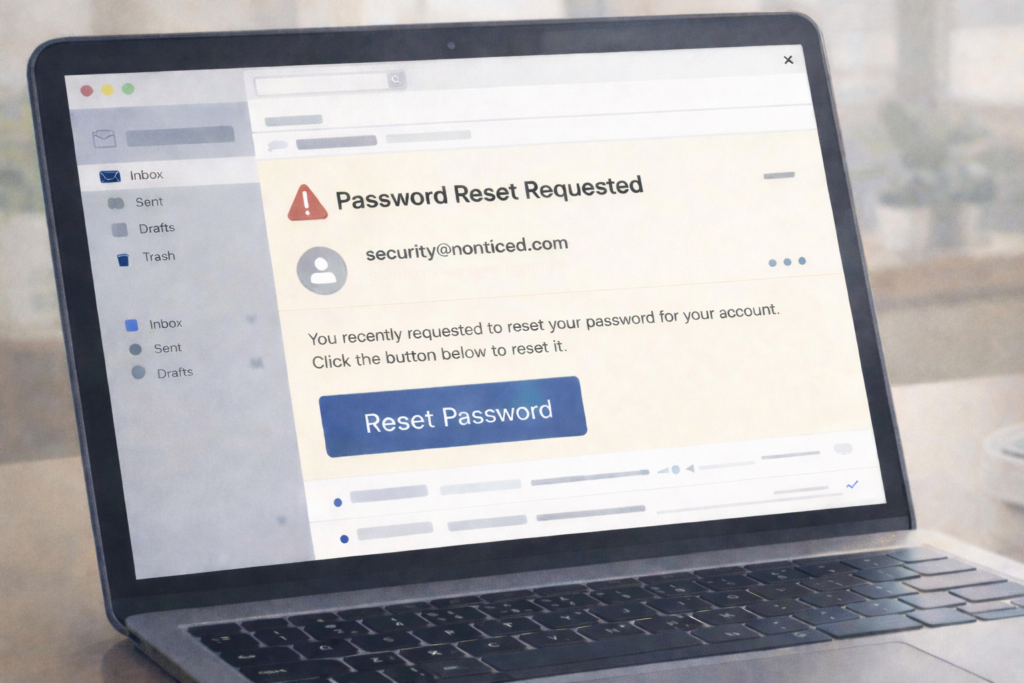
What is the scam?
Scammers send emails that look like legitimate password reset notifications from popular services like Google, Instagram, Microsoft, Amazon, or your bank. The email appears to come from the real company and includes their logos, colors, and professional formatting. The goal is to trick you into clicking a link that leads to a fake login page.
On that fake page, you’re asked to enter your username and password to “confirm your identity” or “verify your account.” In reality, scammers are capturing everything you type. In January 2026, a massive wave of fake Instagram password reset emails hit millions of users, linked to stolen data. The scammers only need you to enter your current password once—that’s all they need to take over your account.
The reason this scam works is simple: password reset emails trigger an immediate emotional response. You either think your account is under attack and act fast, or you think you accidentally requested a reset. Either way, scammers count on you clicking before thinking.
How this scam usually works
You receive an email with a subject line like “Confirm Your Identity” or “Password Reset Request” from what appears to be Instagram, Google, or another service you use. The email looks professional and includes the company’s branding. It says something like “We detected unusual activity on your account” or “You requested a password reset—click here to complete it.”
The link in the email takes you to a website that looks nearly identical to the real login page. You enter your username and password, thinking you’re logging into the legitimate service. The page might even show a loading screen or confirmation message afterward to make it seem real. What you don’t see is that your credentials have been sent directly to the scammer.
Once scammers have your password, they log into your real account and change the password themselves, locking you out. They might steal personal information, access your payment methods, contact your friends and family to spread the scam further, or use your account to impersonate you.
Some versions of this scam include a follow-up step: the fake page asks you to enter a two-factor authentication code. If you fall for this, the scammer now has the code they need to get past your security layer and take full control.
The timing is intentional. Scammers send these emails in batches hoping some will land when people are rushing or on their phones, where fake pages are harder to spot.
Common scam pattern – Most fake password reset emails rely on one thing: getting you to act before you think. If you didn’t request a password reset, there’s nothing to fix—and no link you need to click.
How to protect yourself
The safest approach is to never click links in password reset emails. Instead, open your browser, go directly to the official website by typing the address yourself, and log in normally. If there’s actually a password reset needed, you’ll see the option in your account settings.
Check the sender’s email address carefully. Real companies send password reset emails from official domains. Google uses addresses like account-security-noreply@accounts.google.com. Instagram uses noreply@instagram.com. If the email comes from anything else—even if it’s close—it’s fake. Hover over the sender name to reveal the real email address.
Look at the links before clicking. Hover your mouse over any link in the email and look at the web address that appears. Real password resets link to official company domains only. If the link goes anywhere else, or if you can’t preview it, don’t click.
Watch for common red flags: urgent language (“Act now”), requests for personal details beyond your password, grammatical errors, or generic greetings like “Dear Customer” instead of your name. Real companies usually address you by name and never ask you to verify your password via email.
What to do if you’ve been affected
If you clicked a link and entered your password on a fake login page, change your password immediately on the real service. Go directly to the official website (not through a link), log in if you can, and change your password to something completely different. If you’re locked out, use the account recovery options like a backup email or phone number to regain access.
Check your account activity for unauthorized changes. Look at your login history, password changes, and security settings to see if scammers made changes. If they added a recovery email or phone number, remove it. Change the password on any other accounts that use the same password as well.
If your email was compromised, scammers might be sending fake password reset emails to your contacts using your account. Send them a message through a different method (text, call, social media) letting them know your email was compromised and they should ignore any password reset emails from you.
Report the email to the company being impersonated. Most companies have abuse or security teams that accept reports. Instagram, Google, and others have forms to report phishing emails. You can also report the scam to the FTC at reportfraud.ftc.gov. This helps companies identify attack patterns and protect other people. If you lost money or had unauthorized charges, contact your bank or payment service immediately.
Related Articles
- How to Spot Fake Login Pages and Phishing Websites – Learn the visual clues that reveal fake websites
- Email Phishing Scam – Understand how scammers use email to steal information
- Account Takeover Scam – What happens after scammers get your credentials and how to recover