
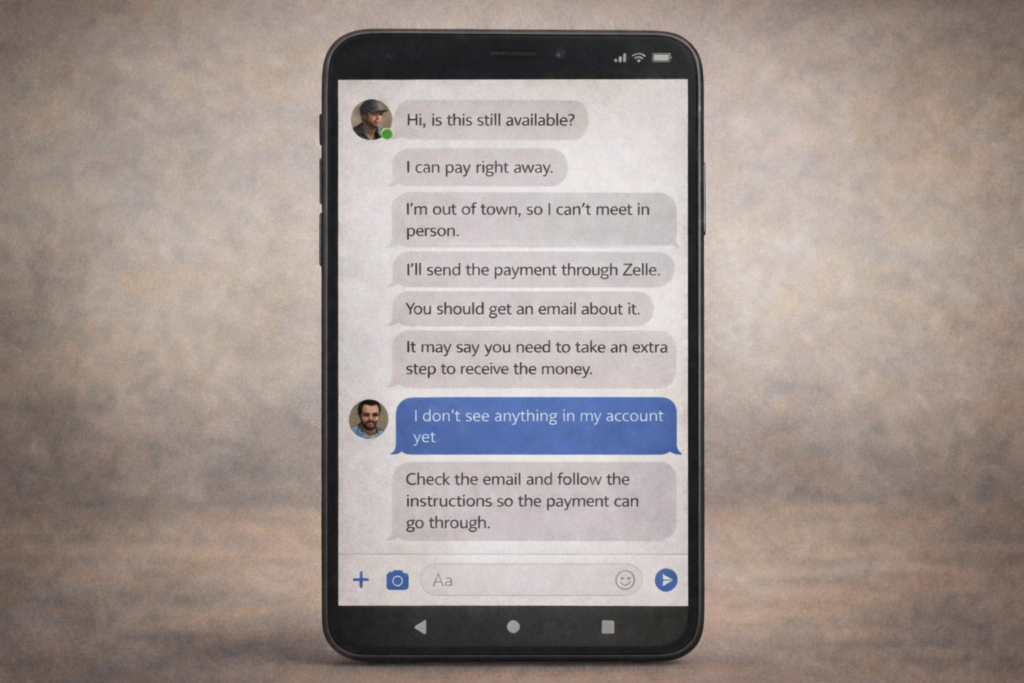
What is the scam?
A Facebook Marketplace Zelle scam is a payment scam where a fake buyer pretends to send money through Zelle, then tricks the seller into sending money instead. The scammer contacts you about an item you’re selling, agrees to pay through Zelle, and claims the payment is on hold. They then say you must “upgrade” to a business account to receive the funds and send a fake email that looks like it’s from Zelle, complete with official logos and formatting, telling you to send money to complete the upgrade. In reality, no payment was ever sent, and any money you transfer goes directly to the scammer.
This is part of a larger pattern of Zelle scams that exploit the platform’s instant transfer feature and lack of buyer/seller protections.
How this scam usually works
The scam begins when someone contacts you about an item you’re selling on Facebook Marketplace. They often agree to your asking price without negotiation and insist on paying through Zelle. They may claim they’re buying the item as a gift, are located out of town, or work irregular hours that make meeting in person difficult.
Shortly after agreeing to buy, the scammer says they’ve sent the Zelle payment. You won’t see any money in your account, but you’ll receive an email that appears to be from Zelle explaining that the payment is pending. The email claims you need to upgrade to a Zelle Business Account to receive payments over a certain amount, typically $300 to $500.
The fake email includes instructions to send a specific amount through Zelle to activate your business account. It may promise the money will be refunded immediately or added to the buyer’s original payment. The email often uses urgent language, suggesting the transaction will be cancelled if you don’t act quickly.
If you follow these instructions and send the money, it goes directly to the scammer. There is no business account upgrade, no pending payment, and the interested buyer disappears. The email address may look official at first glance but uses slight variations like “zelle-support.com” instead of “zellepay.com.”
Some variations of this scam involve fake payment confirmations or claims that you need to send a verification payment. These tactics are similar to other bank impersonation scams where scammers pose as trusted institutions.
Red flags: How to spot a Facebook Marketplace Zelle scam
They insist on Zelle for high-value items. Legitimate buyers typically prefer cash for local transactions or PayPal/Venmo with buyer protection for shipped items.
They agree to your price immediately. Real buyers usually negotiate or ask questions about the item’s condition.
They refuse to meet in person. Even for items worth hundreds of dollars, scammers always have an excuse to avoid face-to-face meetings.
You receive an email instead of an in-app notification. Real Zelle transactions show up in your banking app immediately, not via email first.
The email asks you to send money. This is the biggest red flag and appears in many Zelle payment scams.
How to protect yourself
Zelle does not have business accounts. This is crucial to know. Zelle is a peer-to-peer payment service designed for personal transactions between people who know each other. There is no upgrade process, no account verification fee, and no pending payment system that requires you to send money first.
Never send money to receive money. This applies to any payment platform, not just Zelle. Legitimate buyers do not require sellers to pay fees or send verification payments before receiving funds. If someone asks you to do this, you are dealing with a scammer. This principle also applies to Zelle payment reversal scams where scammers claim you need to send money back.
Verify emails independently. If you receive an email claiming to be from Zelle, do not click any links or call any phone numbers in the message. Open your banking app or visit zellepay.com directly to check for notifications. Scammers create convincing fake emails, but they cannot send messages through official channels.
Meet in person or use Facebook’s approved payment methods. Facebook Marketplace recommends meeting buyers locally and accepting cash, or using Facebook Checkout for eligible items. If a buyer insists on using Zelle and refuses to meet in person, treat this as a red flag.
Only use Zelle with people you know. Zelle itself warns users to only send money to friends, family, and trusted contacts. The platform offers no purchase protection, making it a poor choice for marketplace transactions with strangers.
What to do if you sent money to a scammer
Contact your bank immediately if you’ve sent money to a scammer. Explain that you were tricked into sending a Zelle payment based on a fake email impersonating Zelle. While Zelle transactions are difficult to reverse because they’re designed to be instant, reporting the fraud quickly gives you the best chance of recovery. Some banks have recently improved their reimbursement policies for scam victims.
Report the scammer to Facebook. Go to the buyer’s profile, click the three dots, and select “Report.” Choose the option for fraud or scam. Also report the conversation through Facebook Marketplace itself. While this won’t recover your money, it helps Facebook identify and remove scam accounts.
File a report with the Federal Trade Commission at ReportFraud.ftc.gov and with the FBI’s Internet Crime Complaint Center at ic3.gov. Include all documentation: screenshots of the conversation, the fake Zelle email, and records of the payment you sent. If your bank refuses to help, file a complaint with the Consumer Financial Protection Bureau.
Save all evidence before the scammer blocks you. Take screenshots of the entire conversation, the fake email, and any other communications. Scammers often delete their accounts or block victims after the scam is complete, so preserve this information immediately.
Frequently Asked Questions
Can I get my money back from a Zelle scam on Facebook Marketplace?
Recovery is difficult but not impossible. Contact your bank immediately and explain you were scammed. Some banks now offer reimbursement for certain fraud cases, especially those involving impersonation.
Does Zelle have a business account option?
No. Zelle does not offer business accounts, upgrades, or verification processes that require payment. Any email claiming otherwise is fraudulent.
How can I tell if a Zelle email is fake?
Check the sender’s email address carefully. Legitimate Zelle emails come from @zellepay.com or @earlywarning.com. Fake emails use similar-looking domains. Also, real Zelle notifications appear in your banking app first, not email.
Is it safe to use Zelle on Facebook Marketplace?
No. Zelle is designed for sending money to people you know and trust, not for buying and selling with strangers. Use cash for in-person transactions or Facebook’s approved payment methods with buyer protection.