
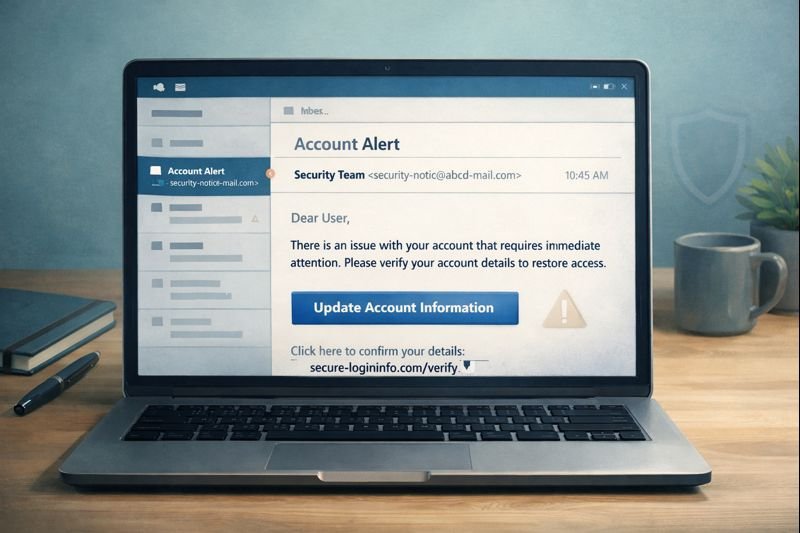
What is email phishing?
Email phishing is a type of online scam where criminals send deceptive emails designed to trick people into revealing sensitive information or taking unsafe actions. These messages are made to look like legitimate communications from trusted companies, organizations, or services you already use, such as banks, email providers, delivery companies, or popular online platforms. The goal is usually to get the recipient to click a link, open an attachment, or enter details like passwords, security codes, or payment information on a fake website, often before they have time to realize the email isn’t genuine.
How this scam usually appears
Most phishing scams arrive by email, often disguised as routine account alerts, password reset notices, security warnings, or billing updates. The message may claim there’s a problem with your account, suspicious activity, or an action required to avoid interruption. Links inside the email typically lead to fake login pages that closely resemble real websites, a tactic explained in more detail in how to spot fake login pages and phishing websites. Some emails also include attachments that can install malware or collect information as soon as they’re opened.
Why this scam continues to work
Email phishing works because it blends into everyday online life. Most people receive real account notifications regularly, so a fake message doesn’t always stand out. Scammers copy branding, tone, and formatting well enough that the email feels familiar rather than alarming. Once trust is established, even briefly, a single click can give attackers access to accounts that can later be used for fraud, identity theft, or additional scams.
Scam pattern – Trust through familiarity
Email phishing scams work by blending seamlessly into everyday digital life. Instead of obvious threats, scammers copy familiar branding, routine notifications, and normal account language to lower suspicion just long enough for you to click, log in, or respond. When a message feels ordinary—password resets, delivery notices, billing alerts—people are less likely to slow down or verify. By the time something feels wrong, access has already been handed over. The scam succeeds not through fear alone, but by making deception feel normal.
Warning signs to watch for
Phishing emails often include subtle red flags, even when they look professional. These may include urgent language pushing you to act quickly, generic greetings instead of your name, slightly misspelled domain names, or links that don’t match the company they claim to represent. Another major warning sign is being asked to provide login credentials, one-time codes, or payment information through an unsolicited message, which legitimate companies do not do.
How to protect yourself
The safest way to handle a suspicious email is to avoid clicking any links or opening attachments. Instead, visit the company’s official website by typing the address directly into your browser and checking your account there. Strengthening your overall security habits also reduces risk, as outlined in how to secure your online accounts. Taking a moment to slow down and verify before reacting is often enough to stop a phishing attempt.
What to do if you’ve been targeted
If you clicked a phishing link or entered information into a suspicious page, act quickly by changing affected passwords, starting with your email account. Enable two-factor authentication wherever possible and monitor your accounts for unusual activity. You can also visit our scam protection resources for step-by-step guidance on recovery and prevention. Many phishing attacks don’t cause immediate damage, so staying alert in the days and weeks after exposure is important.