
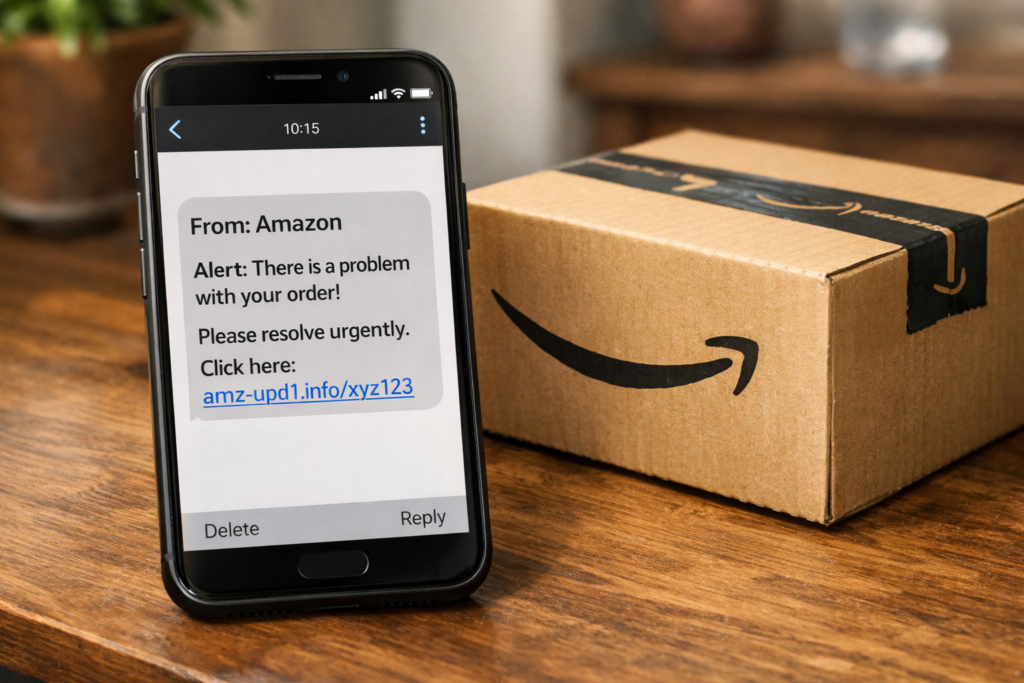
What is the scam?
The Amazon package notification scam is a phishing attack where scammers send fake delivery alerts, order confirmations, or account warnings that appear to come from Amazon. The messages arrive by text, email, or sometimes phone call, and they all share the same goal: getting you to click a link and enter your Amazon login, payment details, or personal information on a fake website.
These scams are among the most common online. In 2023 alone, over 34,000 people reported being contacted by someone impersonating Amazon, with victims losing more than $19 million. During the second half of 2024, Amazon reported that 70% of scam activity targeting its customers involved attempts to steal account information and payment details. Amazon initiated takedowns of more than 55,000 phishing websites and 12,000 phone numbers used in impersonation scams that year.
The Amazon package notification scam is part of a broader category of delivery-related phishing that also includes the USPS delivery problem text scam and other fake package delivery text scams. What makes the Amazon version particularly effective is that millions of people have active Amazon accounts and receive legitimate delivery notifications regularly. Scammers exploit this expectation — if you’re already waiting for a package, a fake “delivery problem” message doesn’t raise immediate suspicion.
How this scam usually works
The scam starts with a message designed to create urgency. The specific story varies, but the goal is always to get you to click a link. Here are the most common versions you’ll encounter.
Fake delivery problem notifications
You receive a text or email claiming there’s a problem with your Amazon delivery — an incomplete address, a failed delivery attempt, or a package that’s being held. The message includes a link to “resolve” the issue. When you click it, you’re taken to a website that looks like Amazon’s login page. You enter your email and password, and the scammer now has your Amazon credentials.
These messages often include fake tracking numbers or order IDs to make them seem more legitimate. They may reference a specific product or dollar amount. The urgency comes from language like “your package will be returned if you don’t update your address within 24 hours.”
Fake order confirmation scams
This version tells you that an order has been placed on your account — usually for an expensive item you didn’t buy, like a laptop or television. The message says something like “If you did not make this purchase, click here to cancel.” You click the link because you’re alarmed, and you land on a fake Amazon page that asks you to “verify your identity” by entering your login, credit card number, or Social Security number.
The psychology here is powerful. You didn’t place the order, so you want to fix it immediately. The scammer counts on this urgency overriding your caution.
Safety recall and refund texts
A newer version that gained popularity in 2025 involves fake safety recall notices. You get a text saying a product you supposedly purchased has been recalled and you should “stop using it immediately.” The message includes a link to “request a refund.” When you click it, you’re taken to a phishing page that collects your Amazon login and payment information.
Refund scams work similarly. You receive a text claiming there’s a problem with a recent purchase and Amazon wants to issue a refund. The link takes you to a page where you enter your bank details to “receive” the refund. There is no refund — the scammer now has your banking information.
Account suspension and Prime renewal scams
These messages claim your Amazon account has been suspended, locked, or flagged for suspicious activity. They tell you to click a link and “verify” your account to restore access. Other versions claim your Amazon Prime membership is about to expire or that a payment for renewal failed. In both cases, the link leads to a fake login page.
Account-related scams represent 82% of phone-based Amazon impersonation cases. In the phone version, a caller tells you your account has been compromised and walks you through “securing” it — which actually means giving the scammer remote access to your device or transferring money to a “safe” account.
Fake delivery fee scams
You receive a notification that your package is waiting at a facility but requires a small redelivery fee — usually between $1 and $5. The amount is low enough that most people don’t think twice about paying it. But when you enter your credit card details to pay the “fee,” the scammer captures your full card number, expiration date, and security code.
Real-world examples
These scams have caused significant financial harm across the country.
A retired woman in Montana lost her entire life savings — $240,000 — in a scam that started with a call claiming to be from Amazon about suspicious activity on her account. That initial call led to a supposed investigation by someone posing as a Drug Enforcement Administration agent. Over the course of the scam, she was convinced that her identity had been stolen and that she needed to move her money to protect it. A man named Zabi Ullah Mohammed was later charged with conspiracy to commit wire fraud, wire fraud, and impersonating a federal agent in connection with the case.
Tripp, a senior in Carlsbad, California, lost over $84,000 after being told by scammers posing as Amazon that wire transfers she’d made hadn’t been received and needed to be resent. She made three separate wire transfers before realizing she’d been scammed. She said the experience changed her — her once positive outlook on life replaced by sadness.
An FTC report from March 2024 documented a victim who received a call about a suspicious Amazon purchase that needed confirmation. The call escalated to claims that a warrant had been issued for their arrest and that accounts totaling $650,000 had been opened in their name. The entire scenario was fabricated, but the urgency and authority the scammers projected made it convincing in the moment.
These cases illustrate a pattern: the initial contact seems routine (a delivery issue, a suspicious charge), but the scam escalates into requests for large sums of money or sensitive personal information. The average financial loss per Amazon scam victim now exceeds $1,000, with some losing far more.
How it works step by step
Here’s the typical flow of an Amazon package notification scam, from first contact to theft:
- You receive the message. A text, email, or phone call arrives claiming to be from Amazon. It references a delivery problem, suspicious order, account issue, or refund opportunity.
- The message creates urgency. Language like “your account will be locked,” “your package will be returned,” or “stop using this product immediately” pushes you to act without thinking.
- You click the link. The URL may look similar to Amazon’s real address but with small differences — extra characters, misspellings, or a completely different domain using Amazon’s name as a subdomain (like “amazon.secure-verify.com”).
- You land on a fake website. The page is designed to look exactly like Amazon’s login screen or account settings page. The layout, colors, and logo all match the real site.
- You enter your information. Depending on the scam version, you might enter your Amazon email and password, your credit card number, your bank account details, or your Social Security number.
- The scammer uses your information. With your Amazon login, they can make purchases on your account, access saved payment methods, and change your account settings. With your credit card or bank details, they can make unauthorized charges or drain your account. With your Social Security number, they can open new accounts in your name.
- The scam may escalate. In phone-based versions, the scammer may transfer you to a “supervisor” or “federal agent” who claims the situation is more serious than initially described. This escalation is designed to keep you engaged and increase the amount of money or information you hand over.
Red flags: Real Amazon messages vs. scams
Knowing the difference between a real Amazon notification and a scam is your best defense:
| Real Amazon Messages | Scam Warning Signs |
|---|---|
| Come from amazon.com email addresses or the Amazon app | Come from random phone numbers or unfamiliar email addresses |
| Never ask you to click a link to “verify” your account | Ask you to click a link to update payment or account info |
| Reference orders visible in your Amazon account | Reference orders you can’t find when you log in directly |
| Never ask for your password via email or text | Ask for your password, credit card, or Social Security number |
| Never threaten account suspension via text message | Use urgent language: “act now” or “your account will be locked” |
| Use your real name in communications | Use generic greetings like “Dear Customer” or “Dear User” |
| Never ask you to pay fees to receive a delivery | Request small “redelivery fees” or “verification payments” |
How to protect yourself
Check your actual Amazon account first. If you receive a message about a delivery problem, suspicious order, or account issue, don’t click the link. Open a new browser tab, go to amazon.com, and log in directly. If the issue is real, it will appear in your account notifications or order history. If there’s nothing there, the message was a scam.
Look at the sender carefully. Legitimate Amazon emails come from addresses ending in @amazon.com. Text messages from Amazon come through the Amazon app’s messaging system, not from random phone numbers. If you receive a text from a number you don’t recognize claiming to be Amazon, it’s almost certainly a scam.
Never enter personal information through a link in a message. Amazon will never ask you to provide your password, credit card number, or Social Security number by clicking a link in a text or email. If a page asks for this information after you’ve clicked a link, close it immediately. Our guide on How To Spot Fake Login Pages and Phishing Websites walks through exactly what to look for.
Be suspicious of urgency. Real delivery issues don’t require immediate action to avoid losing your package. Real account problems are handled through Amazon’s website, not through threatening text messages. If a message pressures you to act immediately, that pressure is the scam. What Real Companies Will Never Ask You To Do covers this principle in more detail.
Watch for small payment requests. Legitimate Amazon deliveries don’t require you to pay a separate fee to receive your package. If you’re asked to pay $1-$5 to “redeliver” a package, the payment page is designed to steal your card information.
Enable two-factor authentication on your Amazon account. This adds an extra step when logging in — usually a one-time code sent to your phone. Even if a scammer gets your password through a phishing page, they can’t access your account without that code.
Report suspicious messages to Amazon. Forward suspicious emails to stop-spoofing@amazon.com. Report suspicious texts by forwarding them to Amazon through the “Report spam” option. This helps Amazon identify and shut down scam operations.
What to do if you’ve been affected
If you clicked a link in a suspicious Amazon message, the steps you need to take depend on what happened next. If you only clicked the link and didn’t enter any information, see our guide on I Clicked a Suspicious Link — What Should I Do Now? for a detailed breakdown of when you need to act and when nothing happened.
If you entered your Amazon login credentials:
Change your Amazon password immediately. Go directly to amazon.com (don’t click any links in messages), log in, and change your password under Account Settings. Enable two-factor authentication if you haven’t already. Check your recent orders and saved payment methods for anything unauthorized. For a full walkthrough, see our guide on How To Secure Your Online Accounts.
If you entered credit card or bank information:
Contact your bank or credit card company immediately. Tell them your card details may have been compromised. They can freeze the card, issue a new one, and monitor for unauthorized charges. Check your recent statements for transactions you don’t recognize.
If you gave someone remote access to your device:
Disconnect from the internet immediately. Run a full antivirus scan. Change passwords for all accounts you access from that device — especially email, banking, and Amazon. Consider having a professional check your device for remote access software the scammer may have installed.
If you sent money (wire transfer, gift cards, or Zelle):
Contact your bank or payment provider immediately. Report the scam to the FTC at reportfraud.ftc.gov. File a complaint with the FBI’s Internet Crime Complaint Center at ic3.gov. Keep all documentation, including messages from the scammer and transaction records.
For all scenarios:
Monitor your credit report at annualcreditreport.com for unauthorized accounts. Set up fraud alerts with Equifax, Experian, and TransUnion if you shared your Social Security number. Save screenshots of all messages and communications related to the scam.