
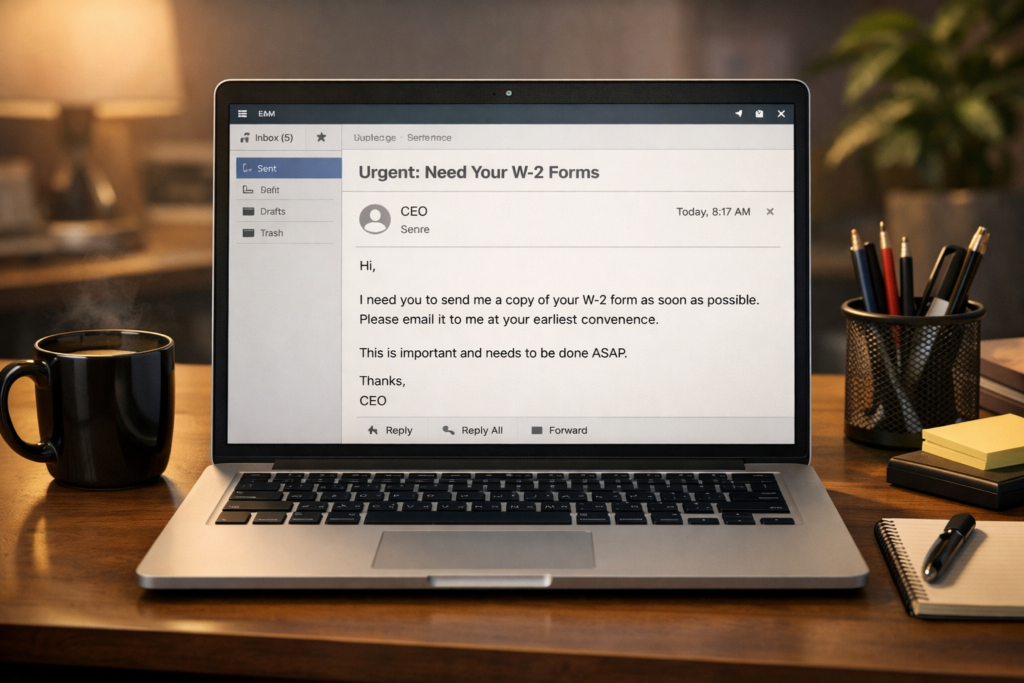
What is the scam?
The W-2 phishing scam is a workplace email phishing scam where a scammer impersonates a company executive—usually the CEO or CFO—and emails someone in payroll or human resources asking for employee W-2 forms. Because W-2s contain names, Social Security numbers, addresses, and income details, this information gives scammers everything they need to file fraudulent tax returns or commit identity theft.
This scam is a form of business email compromise (BEC), a category of attack where scammers pose as trusted people within an organization. Unlike phishing emails that contain suspicious links or attachments, W-2 phishing relies entirely on impersonation. There is usually no malware involved, which makes these emails harder for spam filters to catch.
W-2 phishing spikes every year between January and April, when companies are processing and distributing tax documents. Schools, hospitals, nonprofits, and small businesses are frequent targets, though organizations of any size can be affected.
How this scam usually works
The scam starts with research. Scammers look up a company’s leadership team on the company website or LinkedIn. They identify the CEO, CFO, or another executive by name, then find employees in human resources or payroll who would handle W-2 requests.
Next, the scammer sends an email that appears to come from the executive. They may spoof the email address so it looks identical to the real one, or they may use a slightly altered address that is easy to miss at a glance—like swapping a lowercase “l” for the number “1.” The email is usually brief and professional. It might start with something casual, like “Are you at your desk?” or “I need something handled before end of day.”
Once the employee responds, the scammer asks for a list of all employees and their W-2 forms, or asks for specific information like Social Security numbers and wages. The request often includes a sense of urgency—perhaps the executive is “in a meeting” or “traveling” and needs the information sent right away. Because the employee believes they are helping their boss, they may comply without a second thought.
After receiving the data, scammers move fast. W-2 information may be used to file fraudulent tax returns and collect refunds, or it may be sold in batches on dark web marketplaces. In some cases, the stolen data is split among criminal networks and “processed” across dozens of fraudulent returns simultaneously. By the time the company realizes what happened—sometimes days or weeks later—the damage is already done.
How to protect yourself
The safest approach is to establish a clear policy at your workplace: W-2 information and employee tax data should never be sent by email, regardless of who requests it. If your company does not already have this rule, raise it with your HR or IT department.
If you receive an email requesting W-2s or sensitive employee data, verify the request by calling the person directly using a phone number you already have on file—not a number included in the email. This one step stops most W-2 phishing attempts. Many organizations also use a designated code or verbal confirmation process for requests involving sensitive payroll data.
Pay close attention to the sender’s email address. Scammers often use addresses that look nearly identical to real ones but include small differences—an extra letter, a different domain, or a subtle character swap. If anything looks slightly off, treat the message as suspicious.
Limit access to W-2 information within your organization. The fewer people who can fulfill these requests, the smaller the target. Your company should also use email authentication tools like SPF, DKIM, and DMARC—security protocols that help prevent outsiders from spoofing your company’s email domain.
What to do if you’ve been affected
If your company sent W-2 data in response to a phishing email, act immediately. Notify your IT department and company leadership so they can assess the scope of the breach and begin the response process.
Report the incident to the IRS by emailing dataloss@irs.gov with “W-2 Data Loss” in the subject line. Also forward the phishing email to phishing@irs.gov with “W-2 Scam” in the subject line. File a complaint with the FBI’s Internet Crime Complaint Center at IC3.gov. These reports help law enforcement track and disrupt these operations.
Notify all employees whose information was compromised. They should file an Identity Theft Affidavit (IRS Form 14039) and consider placing a fraud alert or credit freeze with the three major credit bureaus—Equifax, Experian, and TransUnion. Each affected employee should also monitor their tax account through the IRS’s online portal for any returns filed in their name.
Watch for follow-up scams. After a W-2 data breach, scammers sometimes target the same organization or its employees with additional phishing attempts, fake password reset emails, or calls impersonating the IRS. If you receive a message claiming to be from the IRS demanding payment or threatening arrest, that is a separate scam—the IRS does not operate that way. For more on recognizing those tactics, see our guide on what real companies will never ask you to do.