
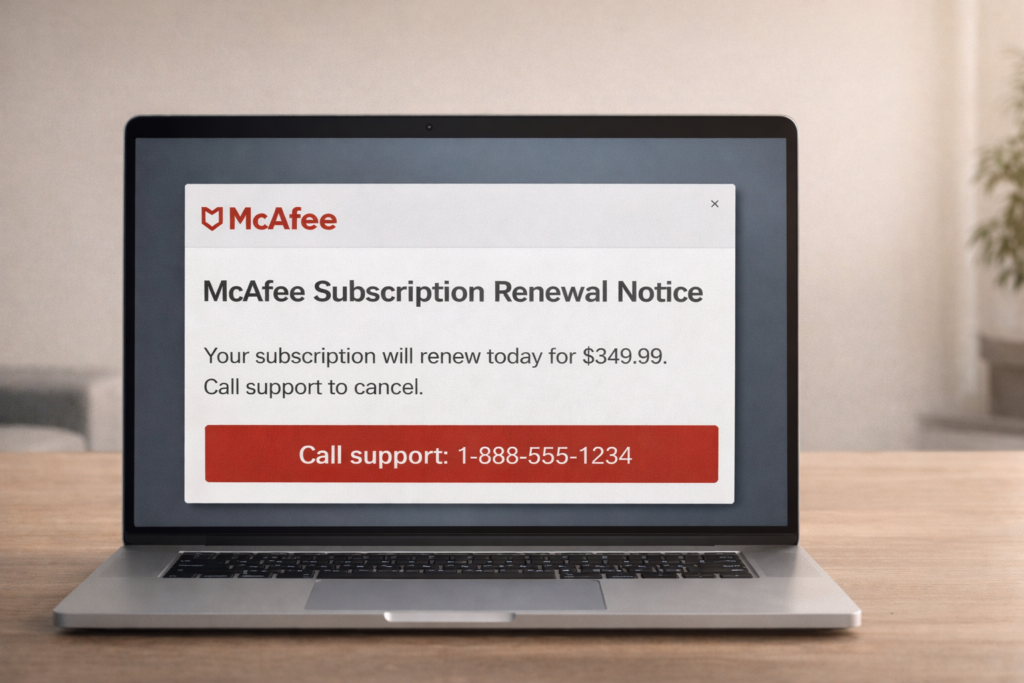
What is the scam?
The McAfee subscription renewal scam is a common brand-impersonation scam where criminals pose as McAfee (or a billing partner) and claim your antivirus subscription is expiring, auto-renewing, or has triggered an unexpected charge. The message is designed to feel routine—like a normal renewal notice—while quietly adding urgency so you act before you verify. These scams are not from McAfee. Their goal is to get you to call a fake support number, click a link, share payment details, or allow remote access to your device.
How this scam usually works
This scam typically starts with an email, pop-up warning, or text message that mentions “McAfee,” a large dollar amount, a renewal date, and a “support” phone number to call to cancel. If you call, the scammer claims they can stop the charge or issue a refund, then pressures you to “confirm” your information or follow steps on your computer. Often this includes installing remote access software so they can take control of the device. Once access is granted, they may attempt to steal banking details, push a fake refund scheme, pressure you into sending money, or use payment methods that are difficult to reverse.
How to protect yourself
Do not call phone numbers shown in pop-ups or unexpected renewal emails, and do not click links in messages claiming to be from McAfee. If you’re concerned about a subscription, open a new browser tab and go to the official McAfee site by typing the address yourself, then check your account status there. Treat unexpected invoices and “renewal confirmed” emails as suspicious until verified independently. Keep your browser and operating system updated, use a pop-up blocker, and consider a password manager (it can help flag fake sites by refusing to autofill on mismatched domains). When a message tries to rush you into immediate action, pause and verify first.
What to do if you’ve been affected
If you called a number, clicked a link, or allowed remote access, disconnect from the internet immediately and remove any remote access tools that were installed. Contact your bank or card issuer right away to report what happened, review recent activity, and ask about blocking or disputing unauthorized transactions. Change passwords for your email and financial accounts (starting with email), enable two-factor authentication where possible, and run a security scan using trusted software. If you shared personal information, monitor accounts closely and consider placing a fraud alert with the credit bureaus.
Related Articles
Subscription Renewal & Billing Scam: How It Works and How to Avoid It